Procrastination is like a drug. When you're in it, it feels great, but come back to reality, and you will drop. Tis' a terrible cycle..
May 27, 2011
Procrastination
May 20, 2011
Toilet Time
 |
| Photo rights to ssalonso on flickr. |
I have a theory that there is a certain space, let's call it a mindspace, that can be harnessed for higher productivity. Your mindspace is the time you have in your mind during which you're physically occupied, e.g. going to the toilet at school/work. Let's try and use every toilet stop during our day to think about something productive shall we? Plan ahead, think about current problems etc. :)
Extra:
I often went to the toilet during exams. The extra exercise, fresh air (out of the exam room, not in the toilet...) and time away from script sometimes helped trigger memory while I thought about whatever I was stuck on.
Mar 24, 2011
Excel Edit Cell Shortcut
Editing an excel file?
Just found the keyboard shortcut that puts the cursor inside the cell: F2.
Saves having to mouse click.
Just found the keyboard shortcut that puts the cursor inside the cell: F2.
Saves having to mouse click.
Jan 25, 2011
Why gmail (not hotmail?) #1 -basic
What's all the fuss about gmail? Some good features:
- Conversations
Emails are stored as conversations instead of individual messages. If you've used iphone or Andriod's messaging system, you know what I mean. It's much easier to see. (Each individual message is expandable, as well as the recipients and extra info.)

- Forgotten Attachment Detector
If you typed something like 'see attachment' in an email, then later forget to attach it, a message will pop up asking if you forgot.
This has definitely helped me! =P

- Undo Send
What? Yes, Gmail has lots of 'lab' features, and this is one of my favourite. It keeps any message you send for 5,10, 15 or 20 seconds, during which you can decide to undo. To use, go to >Settings >Labs >Undo Send >Enable (Really useful for when you realise the second after you send that you addressed the person with Mr. instead of Ms. or something embarrassing like that!)

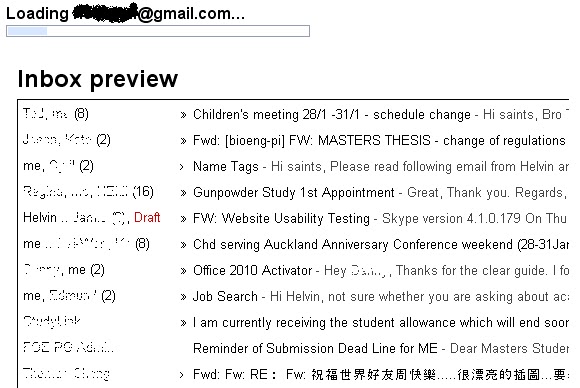
- Inbox Preview
A static sneak peak of your inbox when Gmail is loading. This lets you quickly see if you have unread mail, and saves you having to wait for your inbox to load. To use, go to >Settings >Labs >Inbox Preview >Enable
A great saver if you sometimes have slow internet connection!


Nov 17, 2010
TeXnic Center Starter
First tip: Compile (by clicking on F7) twice if working with a table of contents.
Jan 15, 2010
QDoubleValidator
QDoubleValidator is strange in that it seems to allow data that exceeds its specified range. Actually, it passes with the state 'intermediate', as opposed to 'valid' or 'invalid'. This may seem like a bug, and has been addressed in the C++ language here. Below is my PyQt implementation. It is done by subclassing QDoubleValidator, and making it more strict. (Finally it worked! =P)
class MyDoubleValidator(Qt.QDoubleValidator):
def __init__(self, bottom, top, decimals, parent = None):
Qt.QDoubleValidator.__init__(self, bottom, top, decimals, parent)
def validate(self, input, pos):
state, pos = Qt.QDoubleValidator.validate(self, input, pos)
if input.isEmpty() or input == '.':
return Qt.QValidator.Intermediate, pos
if state != Qt.QValidator.Acceptable:
return Qt.QValidator.Invalid, pos
return Qt.QValidator.Acceptable, pos
You then need to initialize an instance of this class and assign it to the widget, e.g. a lineEdit. E.g:
min = 0
max = 1000
no_decimals = 10
aValidator = MyDoubleValidator(min, max, no_decimals, myLineEdit)
myLineEdit.setValidator(aValidator)
Extra tags:
QDoubleValidator, bug, outside range, not working, QValidator, State
Oct 6, 2009
How to package the PyQt with VTK application
1. Download py2exe from http://sourceforge.net/projects/py2exe/files/
(Download the version that corresponds with your python version.)
(Download the version that corresponds with your python version.)
2. Follow instructions from http://www.py2exe.org/index.cgi/Tutorial
Basically, you need a file called setup.py, like this:
from distutils.core import setup
import py2exe
setup(console=['runui12.py'])
Then run this line in command line:
vtkpython setup.py py2exe
Sep 24, 2009
Navigate Faster with your Keyboard
Hope some of these will help you to navigate faster in typed text. (Thanks to Eugene Isack and Lydia. ^ ^)
Moving Cursor
Home................ = to the beginning of line
End................... = to the end of line
Ctrl + Home..... = to the beginning of page
Ctrl + End........ = to the end of page
Deleting
Ctrl + Backspace......= word to the left
Ctrl + Delete.............= word to the right
Selecting
Shift + left arrow...........................= one character to the left
Ctrl + Shift + left/right arrow......= word to the left/right
Shift + Home/End.........................= Select all till Start/Finish
Internet Browser
Ctrl + Enter..................= when entering URLs automatically adds www & .com
Ctrl + w.........................= close window/tab
Alt + Tab.......................= next tab
Alt + Shift + Tab...........= previous tab
Alt + d.........................= Go to url box
Alt + g..........................=Go to search box
Moving Cursor
Home................ = to the beginning of line
End................... = to the end of line
Ctrl + Home..... = to the beginning of page
Ctrl + End........ = to the end of page
Deleting
Ctrl + Backspace......= word to the left
Ctrl + Delete.............= word to the right
Selecting
Shift + left arrow...........................= one character to the left
Ctrl + Shift + left/right arrow......= word to the left/right
Shift + Home/End.........................= Select all till Start/Finish
Internet Browser
Ctrl + Enter..................= when entering URLs automatically adds www & .com
Ctrl + w.........................= close window/tab
Alt + Tab.......................= next tab
Alt + Shift + Tab...........= previous tab
Alt + d.........................= Go to url box
Alt + g..........................=Go to search box
Windows
Windows + D.........= minimises all windows
Windows + E.........= brings up my computer
Sep 15, 2009
Python loop and modify list
When working with lists, don't modify them as you iterate through.
For example, if you need to remove empty strings in your list, don't delete the strings as you find them, as your loop is still iterating, and some items might be looped through twice, or not at all.
Solution:
Write out another list, or another variable to keep track of what your loop is trying to achieve.
Extra Tags:
Remove whitespace empty string list iterate modify for loop
Sep 10, 2009
Picking actors
I met spent a couple of hours on this picking problem.
Problem:
My pointPicker is giving strange values. Values that are obviously greater than the number of points I have.
Solution:
I had more than one actor in my Render Window Interactor, and the picker was accessing them.
All I had to do was
myActor.PickableOff()
This made my other actors unpickable, so that the picker could do its job of picking my main actor.
Sep 5, 2009
Sep 3, 2009
-1 is true (if loops)
In programming (at least in python), all values except 0, empty strings, etc is true.
That is, if your expression returns something like '-1', your code inside the if loop is still run.
E.g.
myString = 'Hello World'
myString = 'Hello World'
if myString.find('bye'):
print('I found bye.')
Output:
> I found bye.
This is because the .find command returns '-1', which is 'true'.
Instead, you need to replace the if statement to something like so:
if (myString.find('bye') != -1):
(Thanks to Stephen Hansen.)


QStrings and Strings
In Qt, QFileDialog can be used to open up a filedialog window. QFileDialog's static methods allows the GUI to capture the directory/file name that the user chooses. From that, a QString is returned.
My problem was that I wanted to find a certain string in the filename, but it was a QString, and not a string. I found that...
to convert a qstring to string, use the str function.
stringB = str(stringA)
In this situation, stringB will be the string version of stringA, which is of type QString. By the way, str works on integers as well.
PyQt Documentation on Qfiledialog
My problem was that I wanted to find a certain string in the filename, but it was a QString, and not a string. I found that...
to convert a qstring to string, use the str function.
stringB = str(stringA)
In this situation, stringB will be the string version of stringA, which is of type QString. By the way, str works on integers as well.
PyQt Documentation on Qfiledialog
Sep 2, 2009
Backslashes and Forward slashes
Windows requires that paths are written with backslashes (\). If your path is currently forward slashed (/), you just need to use:
path_better = path.replace('/','\\')
To convert the forward slashes to backward ones. Note that the reason why I used TWO backslashes is because the single backslash escapes special characters (except in raw strings).
Of course, if what you need is to convert from backward to forward slash, just swap the order in the brackets. That is --> ('\\','/')
Tags: Converting Convert backward forward slash slashes
Sep 1, 2009
Embedding vtk into a pyqt GUI
Now that vtk is installed with python bindings, all you need to do is to let your GUI find these bindings, then import them into your GUI. Let's jump right into the code. I have skipped some bits that are general for vtk, and have mainly included bits that are directly relevant to the QVTKRenderWindowInteractor.
import sys
// Now append the path of the python wrapping, which comes in the source code.
// Alter the path according to your own path.
sys.path.append("C:\Qt\vtk-5.4.2\Wrapping\Python")
//Import the vtk module
import vtk
import vtk
class StartMain(QtGui.QMainWindow):
# no parent, i.e. is top level widget
def __init__(self, parent=None):
QtGui.QWidget.__init__(self, parent)
self.ui = Ui_main()
self.ui.setupUi(self)
self.ui.meshDisplayWidget = QVTKRenderWindowInteractor(self.ui.meshDisplay) self.ui.meshDisplayWidget.Initialize()
//Set actors and mappers, then instead of creating a renderwindowinteractor,
// use the self.ui.meshDisplayWidget to display the mesh. Also define picker, and
// set data source (for code about displaying a mesh from coordinates, as
// an unstructured grid.
ren = vtk.vtkRenderer()
ren.AddActor(aMeshActor)
ren.AddActor2D(textActor)
ren.AddActor(dotActor)
ren.ResetCamera()
cam1 = ren.GetActiveCamera()
self.ui.meshDisplayWidget.GetRenderWindow().AddRenderer(ren)
self.ui.meshDisplayWidget.SetPicker(picker_point)
self.ui.meshDisplayWidget.show()
Aug 26, 2009
VTK displaying finite element mesh using vtkunstructuredgrid from data file of coordinates
Hi guys,
Just wanted to show you my current working code. I am displaying a finite element mesh, using a vtkunstructuredgrid. The data consists of data points starting from 1, their coordinates, as well as connectivity info, that is, how the points connect to form cells/ elements.
Here it is below:
#!/usr/bin/env python
# Author: Helvin Lui
# This is a function, which takes a string parameter: file_path. This string is
# the path of the geometry txt file from which vtk will grab and display data.
def displayMesh(file_path):
import vtk
from vtk import vtkTriangle, vtkQuad
VTK_TRIANGLE = vtkTriangle().GetCellType()
VTK_QUAD = vtkQuad().GetCellType()
with open(file_path, 'r') as f:
aMeshGrid = vtk.vtkUnstructuredGrid()
# The numbers in the bracket below does not appear to make a huge difference.
# I read somewhere that its only an estimate of something...
aMeshGrid.Allocate(2, 180)
# Get number of mesh points
no_points = int(f.readline())
# Set number of points
meshPoints = vtk.vtkPoints()
meshPoints.SetNumberOfPoints(no_points)
# Iterate through point data
for i in range(no_points):
# Get coord info for each point
point_info = f.readline().split() # I need to split, before I assign to point_coord
# else the whole thing is split into single numbers
point_ID = (int(point_info[0])-1) # -1 because the IDs need to start with 0.
point_x = float(point_info[1])
point_y = float(point_info[2])
point_z = float(point_info[3])
# Set coord info in mesh
meshPoints.InsertPoint(point_ID, point_x, point_y, point_z)
# Get number of elements
no_elements = int(f.readline())
# Set number of elements
for i in range(no_elements):
element_info = f.readline().split()
element_ID = (int(element_info[0])-1)
element_no_nodes = int(element_info[1])
element_ID_list = vtk.vtkIdList()
for j in range(element_no_nodes):
node_no = int(element_info[j+2])
element_ID_list.InsertNextId(node_no -1)
print j, node_no
if element_no_nodes == 3: # a triangle
cell_type = VTK_TRIANGLE
elif element_no_nodes == 4: # a rectangle/quad
cell_type = VTK_QUAD
aMeshGrid.InsertNextCell(cell_type, element_ID_list)
aMeshGrid.SetPoints(meshPoints)
aMeshMapper = vtk.vtkDataSetMapper()
aMeshMapper.SetInput(aMeshGrid)
aMeshActor = vtk.vtkActor()
aMeshActor.AddPosition(0,0,0)
aMeshActor.SetMapper(aMeshMapper)
aMeshActor.GetProperty().SetDiffuseColor(0, 0.5, 0)
aMeshActor.GetProperty().SetEdgeVisibility(1)
aMeshActor.GetProperty().SetEdgeColor(1, 0, 0)
# Create the usual rendering stuff.
ren = vtk.vtkRenderer()
renWin = vtk.vtkRenderWindow()
renWin.AddRenderer(ren)
renWin.SetSize(300, 300)
iren = vtk.vtkRenderWindowInteractor()
iren.SetRenderWindow(renWin)
ren.AddActor(aMeshActor)
ren.ResetCamera()
cam1 = ren.GetActiveCamera()
## Render the scene and start interaction.
iren.Initialize()
renWin.Render()
iren.Start()
The data file that you might display could look like this:
7
1 1.000000000 0.000000000 0.000000000
2 3.000000000 0.000000000 0.000000000
3 0.000000000 2.000000000 0.000000000
4 2.000000000 2.000000000 0.000000000
5 4.000000000 2.000000000 0.000000000
6 1.000000000 4.000000000 0.000000000
7 3.000000000 4.000000000 0.000000000
6
1 3 1 4 3
2 3 1 2 4
3 3 2 5 4
4 3 3 4 6
5 3 4 7 6
6 3 4 5 7
It is essentially 'the number of points', then a list of point IDs and their coordinates, then 'the number of elements', then a list of point IDs and their shape (no. of sides; in this case, the elements are triangles), and the coordinates.
Note that I was getting problems with the point IDs, because my data file's IDs started with 1. However, vtk numbering starts with 0. So I needed to '-1' (in red font above) whenever I accessed point numbers. So you will need to be careful if your data points start at 1.
Aug 4, 2009
Actor Color / Colour Change
I am using VTK (Visualization Toolkit) to display a shape, read in from a file called test.vtk
I am coding in Python. I want to be able to change the shape from the default redish to a blue.
According to http://www.vtk.org/VTK/help/examplecode.html, a tried drawing a blue sphere, in python. It worked.
from vtk import *
sphere = vtkSphereSource()
sphere.SetRadius(1.0)
sphere.SetThetaResolution(18)
sphere.SetPhiResolution(18)
map = vtkPolyDataMapper()
map.SetInput(sphere.GetOutput())
aSphere = vtkActor()
aSphere.SetMapper(map)
aSphere.GetProperty().SetColor(0,0,1)
ren1 = vtkRenderer()
renWin = vtkRenderWindow()
renWin.AddRenderer(ren1)
iren = vtkRenderWindowInteractor()
iren.SetRenderWindow(renWin)
ren1.AddActor(aSphere)
ren1.SetBackground(1,1,1)
renWin.Render()
iren.Start()
However, when I changed the code to read in my data file, test.vtk, it did not work. By this, I mean that the shape was still drawn, but it was redish, and not blue. The first few lines of the above were changed to:
from vtk import *
Reader = vtkUnstructuredGridReader()
Reader.SetFileName("test.vtk")
sphere = Reader # cone is an unstructured grid
map = vtkDataSetMapper()
map.SetInput(sphere.GetOutput())
#
aSphere = vtkActor()
etc...as above.
Solution:
Add this line:
map.ScalarVisibilityOff()
at the place where the '#' is positioned above.
Why?
The colour in the actor’s property only takes effect if there is no scalar data available to the actor’s mapper. By default, the mapper’s input scalar data colours the actor, and the actor’s colour is ignored. To ignore the scalar data, use the method ScalarVisibilityOff().
(Taken from the book: The VTK User's Guide; updated for VTK Version 5)
Jul 29, 2009
How to keep your laptop kinda cool (at no cost)
Yes, there are fancy fans that you may get, which run on power supplied by your machine via USB plugs. But there's a cheaper option.
Simply by placing two equally sized objects under the back of your laptop.
This leaves space under your laptop, which provides better ventilation around your laptop, therefore allows your laptop's cooling system to work more efficiently.

For me personally, this has saved my laptop reaching uncomfortably hot temperatures for my hands. And also raises my keyboard, which makes my computing experience more comfortable.

Jul 27, 2009
How to call (or execute) a python file from another
Simply type in the following 2 lines of code in your python file (e.g. main.py), to call another python file (e.g test.py).
#Specify the path of the file you want to execute. E.g:
file_path = 'C:\\test.py'
#Execute the file using execfile
execfile(file_path)
Copied from:
Jul 26, 2009
How to Install VTK for use with Python
I am installing VTK, which I will need to incorporate 3D visualisation in my GUI. I am designing my GUI in Qt, and programming with Python. (Hence, PyQt). To make VTK work with Python, you need to install from binaries, instead of downloading with the windows installer. Feel free to make comments, or ask questions. (I'm not an expert. I am actually a beginner, but I want to document my problems and solutions so that others can be benefited. So feel free to talk here, as it might help others too.)
Download and install:
Cmake(http://www.cmake.org/cmake/resources/software.html)
Python(http://www.python.org/download/releases/)
Download and unzip into a file (we will call this the source file):
VTK(http://www.vtk.org/VTK/resources/software.html): Source: vtk-5.4.2.zip (Don't use the windows installer, because then you can't use Python.)
Then follow these steps:
1. Open the Cmake 2.6 GUI, and type in the path for the source file, and also where you would like to store the binary files.
Source: C:/Qt/vtk-5.4.2 (I have unzipped the source file into this directory called vtk-5.4.2, which is in my 'Qt' folder. Type in the path for your source file.)
Binary: C:/Qt/VTKbin7 (This is an empty folder, into which Cmake will put binaries.)
>Configure
>Choose Visual Studio 8 2005 as generator
>Configure
>Generate
2. Open Visual Studio;
Open File;
Find the folder where Cmake has put your binaries. E.g. C:/Qt/VTKbin7
Open VTK.sln
3. >Build >Configuration Manager >Active solution configuration
>Choose ‘Release’
>Ok
4. >Build
>Build Solution
This will take more than an hour.
5. Now you should be able to find ‘vtkpython.exe’ in your bin/release file. E.g. C:/Qt/VTKbin7/bin/release
Now go to Embedding VTK into a PyQt GUI
Subscribe to:
Posts (Atom)